How an ultrasound system is built: from probe to picture
Follow an echo from the probe face to the monitor and name the block that each common complaint points to, so that you can separate a probe fault from a system fault before you open a cover.
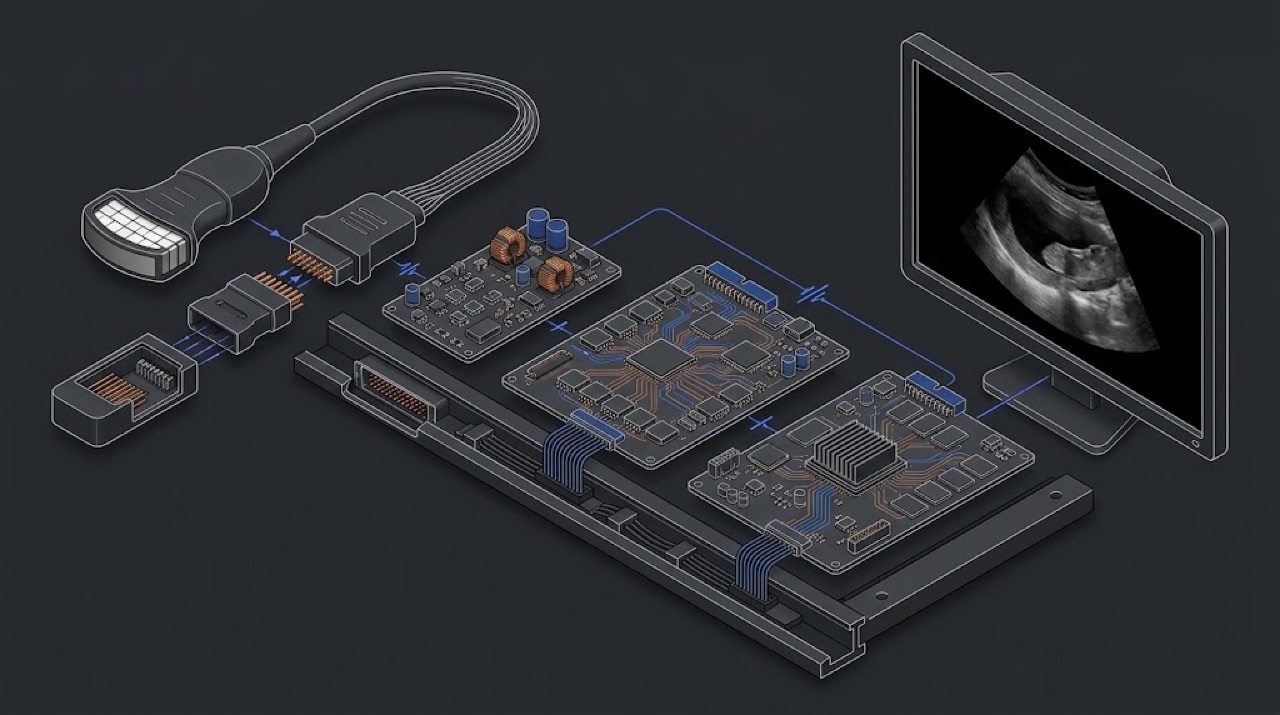
What the machine actually does
An ultrasound system does one simple thing thousands of times a second. It sends a short burst of sound into the body and then listens. Every boundary between tissues reflects a small part of the sound back. The system turns the time each echo takes to return into a depth, and the strength of the echo into a brightness. Do this along a few hundred lines across the probe face and you have one B-mode frame. Repeat the frame many times a second and you have real-time imaging.
The arithmetic rests on one assumption: sound travels through soft tissue at about 1540 metres per second. The system does not measure this speed; it assumes it and calculates depth from it. Echoes from deeper structures take longer to return and also come back weaker, because tissue absorbs sound, and it absorbs higher frequencies faster. That trade-off — high frequency for fine detail near the surface, low frequency for reaching deep organs — is why one department needs several different probes. Lesson 2 returns to this.
For a service engineer the useful model is a chain of blocks, each passing the signal to the next. When the image is wrong, the question is always the same: at which link did it go wrong? This lesson walks the chain in the order the signal travels, and for each link says what it does and how it usually fails.
The probe: the first and most fragile link
Inside the probe is an array of small piezoelectric elements — commonly a hundred or more on an ordinary one-dimensional array, and thousands on a matrix probe. A voltage pulse makes each element ring at its resonant frequency; a returning echo makes it produce a tiny voltage. In front of the elements sit one or more matching layers, which help the sound pass from hard ceramic into soft tissue, and the acoustic lens — the rubbery face the patient touches — which focuses the beam in the thin direction across the array. Behind the elements a backing block damps the ringing so that pulses stay short. Each element has its own fine conductor running through the cable to the connector.
Every one of these parts can fail in the field. Elements crack or lose their connection, and each lost element is a lost contributor to the image. Lenses are cut, worn by abrasive wipes, swollen or dried by the wrong chemicals, and separated from the layers beneath (delamination). Cables are run over by chair wheels, kinked in drawers and wound tightly around the hand, and the fine conductors break inside an undamaged jacket, usually close to the strain relief at either end. Connectors are dropped, pins are bent and contacts collect dust. The probe is the part the user handles hundreds of times a day, so it is no surprise that a large share of ultrasound service calls end at the probe.
The lens, the housing and the cable jacket are also the insulation between the patient and the electronics. A crack is not only an image problem; it is an electrical safety problem. Lesson 3 deals with that.
Connector, probe recognition and switching
A probe connector carries far more contacts than an ordinary cable connector, because every element needs its own path, plus shields and control lines. A mechanical latch pulls the connector firmly onto the port. Most probes also carry a small identification circuit or memory, so that the system knows which probe is attached and loads the right presets and the right acoustic output limits. A probe that is 'not recognised' may therefore have a fault in the identification path, in the connector pins or in the system port — not necessarily in the array.
Most systems have more probe ports than sets of front-end electronics, and many probes have more elements than the system has channels. Relays or electronic multiplexers sit between the ports and the channels. They select the active port, and on many designs they also select which group of elements is connected to the channels for each scan line. On many systems you can hear the relays click at start-up or when you change probes. A failed relay or multiplexer path gives a fault that follows the port or the channel, not the probe — one of the most useful clues you have.
Transmit and receive: high voltage out, microvolts back
The transmitter, or pulser, produces the drive pulse for each element with precisely controlled timing and amplitude. The pulses come from a dedicated high-voltage supply inside the system. Their amplitude depends on the model, the probe and the mode, and the system limits it to keep acoustic output within the permitted range. Two facts matter here. First, there is high voltage on the transmit circuits and at the probe connector while the system is scanning, so covers come off only with the system switched off, disconnected from the mains and allowed to discharge as the manufacturer describes. Second, a shorted probe or a damaged port can overload the transmit supply. On some systems one faulty probe can trigger a transmit-power error that stops imaging on every probe.
On the way back the echoes are tiny, many orders of magnitude smaller than the transmit pulse. A transmit/receive switch protects the sensitive receiver while the pulse goes out. Each receive channel then has a low-noise amplifier, time-gain compensation (TGC) — extra gain applied to later, deeper echoes to make up for attenuation — and an analogue-to-digital converter. Faults here typically take out a group of channels on one board, and they show on every probe that uses those channels.
Beamformer and image processing
The beamformer is what makes an array more than a row of separate microphones. On transmit it fires the elements with small time delays so that their wavefronts add up into a beam that is focused at a chosen depth and, on some probes, steered to a chosen angle. On receive it delays and sums the signals from many elements so that echoes from the point of interest add up and echoes from elsewhere partly cancel. Current systems do this digitally, in dedicated hardware or largely in software. Because every line is built from many elements, a dead element or a dead channel rarely gives a blank screen. It gives a vertical stripe of lower brightness, or a softer, noisier region, because one contributor to each affected line is missing.
After beamforming, the processor detects the echo envelope for B-mode, calculates frequency or phase shifts for colour, pulsed-wave and continuous-wave Doppler, and converts the lines from the probe's geometry into the rectangular pixels of the monitor (scan conversion). Faults at this stage tend to be mode-specific: B-mode is normal but colour is missing or noisy, or CW Doppler fails while everything else works. Remember that many apparent faults at this stage are presets, filters and user settings, not hardware.
The PC: an ordinary computer in an unusual box
Behind the imaging electronics, almost every current system runs on a PC-type computer: a standard operating system, a hard disk or SSD, memory, a graphics card, a CMOS battery, USB hubs for the control panel and a network interface for DICOM. It fails like any PC. Disks wear out, fans and filters clog and the system overheats, mismatched memory causes random freezes, a flat CMOS battery after months in storage gives start-up errors, and a failed graphics card leaves the monitor showing 'no signal'. The power supplies and the cooling serve both halves of the system, so a cooling problem can appear as an imaging problem and the other way round.
Treat this half with the same discipline as the imaging half. Read the logs before you replace anything, check cooling first because it is free, and never replace a disk or reinstall software without a valid software image and a backup of the presets and options for that exact system. Options and licences are tied to the system; they are restored through the manufacturer's procedure, never worked around.
Reading a complaint against the chain
When the call comes in, place the complaint on the chain before you travel. Three questions do most of the work: does it happen on one probe or on all probes, on one port or on all ports, in one mode or in all modes? The answers point to a block:
- One probe, on any port — dark vertical line, flicker when the cable moves, 'not recognised': the probe, its cable or its connector.
- Every probe on one port, other ports normal: the port, its pins or its switching.
- Every probe on every port, stripe in the same place: receive channels or the beamformer.
- Weak image on every probe in every mode, once settings are excluded: transmit supply or pulser.
- One mode only, for example colour or CW Doppler: processing, presets or that mode's own hardware path.
- Freezes, reboots, no boot, blank monitor: PC, disk, memory, graphics, cooling or power supply.
| Part | What it does | How it fails | |
|---|---|---|---|
| 01 | Probe array, lens and cable | Turns pulses into sound and echoes into voltages | Dead elements, cut lens, broken conductors near strain reliefs |
| 02 | Probe connector and ID circuit | Many contacts plus probe identification | Bent or dirty pins; 'not recognised' |
| 03 | Ports, relays and multiplexers | Select the active port and element groups | Fault follows the port or channel, not the probe |
| 04 | High-voltage supply and pulsers | Drive each element with timed pulses | Overloaded by a shorted probe: transmit-power error on all probes |
| 05 | T/R switch, LNA, TGC and ADC | Protect and amplify microvolt echoes, digitise | Group of channels lost on one board |
| 06 | Beamformer | Delays and sums elements into focused lines | Stripe or noisy region on every probe |
| 07 | Image processor and scan converter | Detection, Doppler, conversion to pixels | Mode-specific faults: colour or CW missing |
| 08 | PC, disk and graphics | Runs the software, stores images and presets | Disk wear, freezes, flat CMOS battery, 'no signal' |
| 09 | Power supplies and cooling | Power and cool both halves of the system | Clogged filters, failed fans, overheat freezes |
One probe stopped the whole system
A cart-based obstetric system in a private clinic showed a transmit-power error shortly after a sonographer connected a convex probe that had been dropped earlier that week. After a restart the system would not image with any probe, and the clinic expected a failed power supply board. On the phone, the engineer asked which probe had been plugged in last and asked the clinic to leave it disconnected. On site, he restarted the system with two known-good probes only: both imaged normally and the error did not return. The dropped probe was tagged, kept away from the clinic's second system and sent for testing. No board was replaced.
A damaged or shorted probe can load the transmit supply and look like a system failure. Remove suspect probes and restart with known-good ones before ordering boards, and do not plug a suspect probe into another system until it has been checked.
Stripes that lived in the screen
A service engineer was called to a cart system whose main monitor showed fine horizontal lines and dots during scanning. Rebooting had helped for a few days, then the lines became permanent, and the department was convinced the beamformer was failing. Before opening anything, the engineer connected an external monitor to the system's video output. The live image on the external monitor was clean, with the same probe and preset. The fault therefore sat after the image had been formed: in the display panel, its cable or its controller, not in the transmit and receive chain. The display path was repaired, the image was checked on both monitors, and no front-end board was touched.
Use a second display to split the chain: if the image is clean on an external monitor, the fault is in the display path, and the probe, front end and processing are working.
On-site checklist
- Ask three questions before travelling: one probe or all, one port or all, one mode or all.
- Ask what changed recently: a dropped probe, cleaning, transport, a software update, long storage without power.
- Write down the exact error text and save the system logs before replacing anything.
- Move the suspect probe to another port, and put a known-good probe of the same type on the suspect port.
- After a transmit-power or similar error, remove the suspect probe and restart with known-good probes only.
- Open covers only with the system off, disconnected from the mains and discharged as the manufacturer describes.
- Back up presets, options and configuration before any disk or software work.